Executive Summary
The demo frames computer use in Codex as a shift from foreground screen control toward background local automation. Instead of taking over the user's primary cursor, Codex can run independent app-specific cursors that continue working while the person keeps using the machine.
The key architectural move is hybrid perception. Codex can still use screenshots and visual coordinates when needed, but the video emphasizes OS accessibility trees as a richer structural source for menus, controls, text, and even content that is not currently visible on screen. It also presents computer use as moving into mainline GPT model capabilities rather than remaining a separate, specialized agent model path.
For builders, the practical lesson is that local agents are not only a model problem. Reliability depends on app-level permission boundaries, robust accessibility metadata, model choices between vision-based and text-only paths, and how interfaces expose clean structure.
Key Takeaways
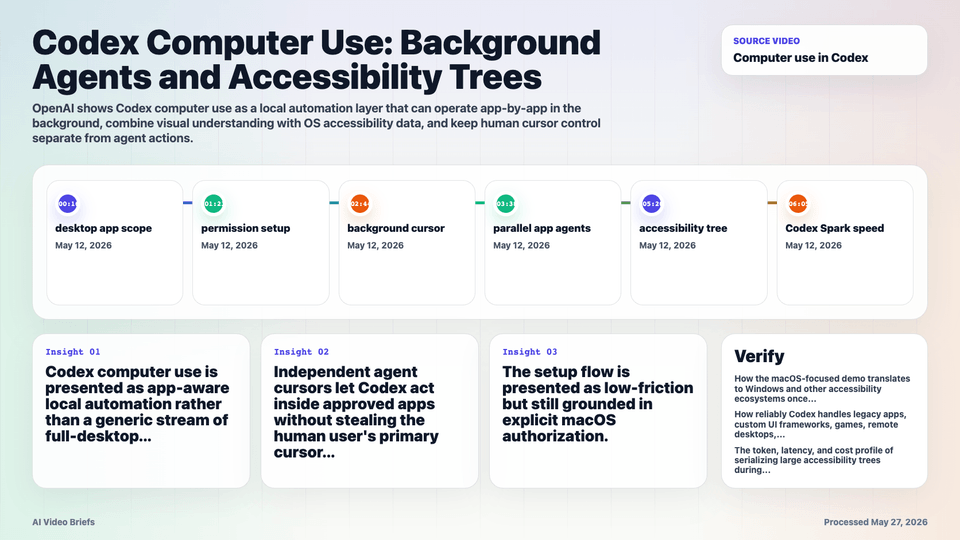
- Codex computer use is presented as app-aware local automation rather than a generic stream of full-desktop screenshots.
- Independent agent cursors let Codex act inside approved apps without stealing the human user's primary cursor or focus.
- The setup flow is presented as low-friction but still grounded in explicit macOS authorization.
- The demo shows multiple app workflows running in parallel, including separate agent actions in different applications.
- Accessibility trees give the model structured UI context, including labels, hierarchy, controls, and text that may be off-screen.
- Visual understanding remains useful, but pure screenshot-and-coordinate control is treated as slower and less structurally informed.
- Text-only models such as Codex Spark can become viable for clean UI automation when the OS provides enough semantic structure.
- OpenAI positions the capability as part of mainline GPT model behavior rather than a fully separate specialized agent model.
- The permission model is app-by-app: Codex should only see and control applications the user explicitly grants.
Builder Implications
- Treat accessibility metadata as agent infrastructure. Clear labels, roles, focus behavior, and hierarchy can make software easier for agents to operate.
- Design local automation around scoped app permissions instead of assuming a model should observe the whole desktop.
- Use hybrid routing: visual models for ambiguous or canvas-heavy tasks, and faster text-oriented models when the accessibility tree is reliable.
- Prefer structural targets over screen coordinates where possible, because UI scaling, scrolling, and window movement can break coordinate-only actions.
- Expect background execution to run seamlessly alongside human inputs without cursor conflict.
Things to Verify
- How the macOS-focused demo translates to Windows and other accessibility ecosystems once support expands.
- How reliably Codex handles legacy apps, custom UI frameworks, games, remote desktops, or canvases with weak accessibility metadata.
- The token, latency, and cost profile of serializing large accessibility trees during long-running desktop tasks.
- Whether a graceful fallback exists from structured UI control to screenshots, and how that affects speed, reliability, and auditability.
- How app-by-app permissions are logged, revoked, and enforced when multiple agents run concurrently.