Executive Summary
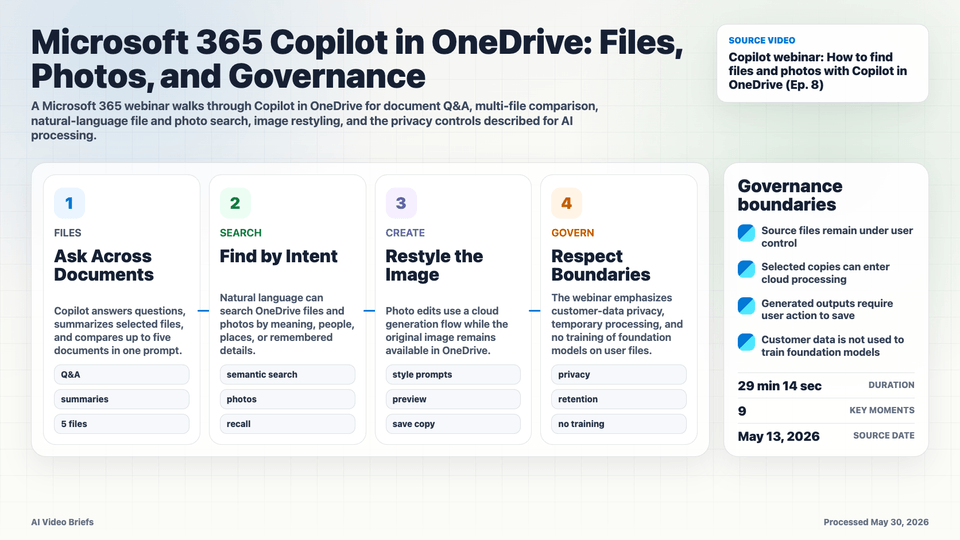
This Microsoft 365 webinar focuses on Copilot inside OneDrive, showing how AI features sit directly over a user's file and photo library rather than in a separate assistant surface. The demos cover document questions, multi-file comparison, FAQ-style extraction, natural-language search, and image restyling.
The product pattern is practical: Copilot meets the user at the file, folder, or photo they already have open, then turns selected content into summaries, comparisons, generated tables, or edited media. That makes storage metadata, supported file formats, and selected-file boundaries part of the AI interface.
The governance discussion is just as important as the demos. The presenters describe cloud processing boundaries for image generation, temporary handling of processing artifacts, and Microsoft's statement that customer files and generated outputs are not used to train foundation models.
Key Takeaways
- Copilot in OneDrive is demonstrated as an inline assistant for selected files, with entry points that reduce the distance between finding a file and asking about it.
- Single-document Q&A and summarization are paired with multi-file comparison, letting a user ask across a small set of selected documents instead of opening each one manually.
- The webinar shows structured outputs such as FAQ-style extraction, which hints at file-store AI becoming a lightweight transformation layer rather than only a search layer.
- Natural-language search extends into photos and remembered details, making media metadata and semantic indexing part of the Copilot experience.
- Image restyling is described as a cloud processing flow where the original file remains in OneDrive and generated results can be previewed or saved by the user.
- Supported-format and file-count limits matter: builders should treat file selection, format parsing, and prompt context size as first-class UX constraints.
- Microsoft reiterates privacy boundaries, including no use of customer files or generated images to train foundation models.
Builder Implications
- For document AI products, place prompts where the user already manages files instead of forcing a separate upload-and-chat workflow.
- Represent selected-file scope clearly. Users need to see which documents are being compared and which content is outside the current context.
- Design structured outputs, such as FAQs or comparison tables, as exportable artifacts rather than transient chat text.
- For media generation, separate source-file storage from processing copies, previews, and user-confirmed saved outputs.
- Make privacy promises operational: retention windows, model-training exclusions, and tenant boundaries should be visible enough for enterprise review.
Things to Verify
- Exact supported formats, size limits, and language coverage for Copilot queries across OneDrive files.
- How reliably multi-file comparison works when documents have conflicting structure, stale versions, or embedded tables and images.
- The latency and cost profile of photo restyling when source assets, generated previews, and saved outputs move through different storage states.
- The precise retention, deletion, and audit-log behavior for temporary image-processing artifacts in enterprise tenants.