Executive Summary
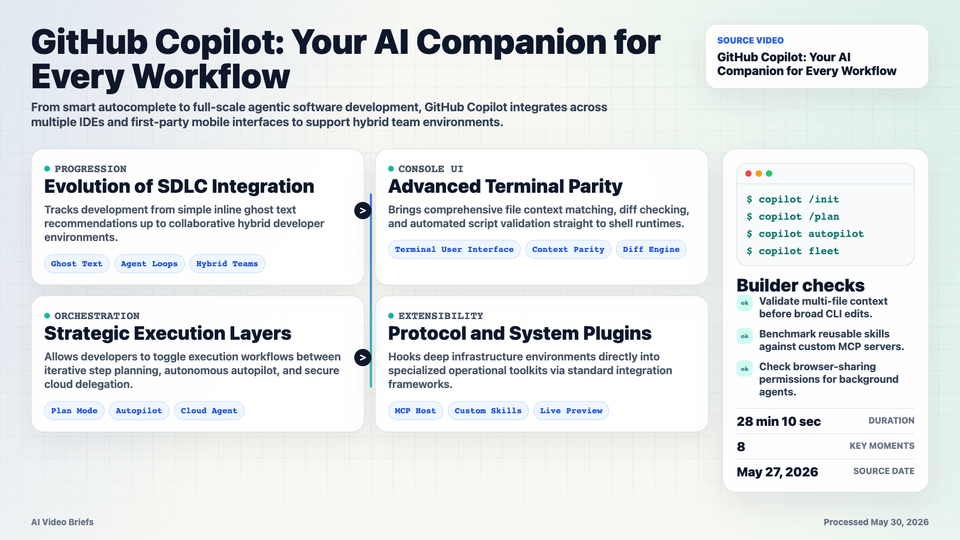
The software development lifecycle is shifting through defined waves: starting at baseline ghost-text code completion, progressing into current agentic workflows where developers supervise task loops, and tracking toward hybrid teams of humans and autonomous agents working collaboratively.
GitHub Copilot ensures ecosystem parity by serving identical subscription capabilities across first-party surfaces like github.com and mobile apps, alongside diverse developer tools such as Copilot CLI, VS Code, Visual Studio, JetBrains, Xcode, and instant chat channels like Slack and Microsoft Teams.
A technical deep dive highlights the terminal user interface (TUI) capabilities of Copilot CLI, featuring native Model Context Protocol (MCP) integrations, custom instructions files, and distinct modes. Developers can map complex multi-file objectives using Plan Mode, assign automated modifications via Autopilot, or delegate tasks directly to remote cloud agents.
Key Takeaways
- Ecosystem progression maps from pair programming assistance to sophisticated wave-2 and wave-3 autonomous hybrid units.
- Single identity mechanics enable a single GitHub subscription to function universally across all supported terminals and IDE tools.
- Copilot CLI features a rich terminal interface showing multi-file context tracking and live repository structural diffs.
- Model Context Protocol (MCP) servers and reusable Skills allow developers to plug in domain-specific tasks and tooling extensions.
- Plan Mode enforces structured development by creating a conceptual strategy for validation prior to modifying active directories.
- Live workspace browser sharing grants agents active visual contexts to execute interface actions, like theme clicking, directly.
Builder Implications
- Incorporate multi-surface interface components to let users orchestrate automated background tasks across command lines and web tools simultaneously.
- Expose clean multi-file serialization strategies within proprietary applications to ensure context windows fully parse broader repository dependency trees.
- Build modular plugin layers that comply with extensible protocols like MCP to simplify integration with external developer frameworks.
- Utilize plan-approval patterns to let users evaluate and change generated code vectors before triggering structural mutations.
- Embed sandboxed visual preview canvases into developer tools to accelerate the testing loops of layout changes.
Things to Verify
- Verify accuracy of multi-file dependency parsing when delegating deep codebase modifications to automated CLI cloud environments.
- Qualify the operational efficiency trade-offs when transitioning from custom localized MCP servers to generic reusable skills.
- Confirm that authorization contexts are correctly managed when sharing active browser runtimes with background agent instances.